
Install GanttSnap in PowerPoint — no downloads, no manual setup. Three ways to do it, below.
See installation options
Pick whichever fits how you work. Installing from directly inside PowerPoint is the fastest for most people.
No browser, no separate download page — search and install without leaving the app.
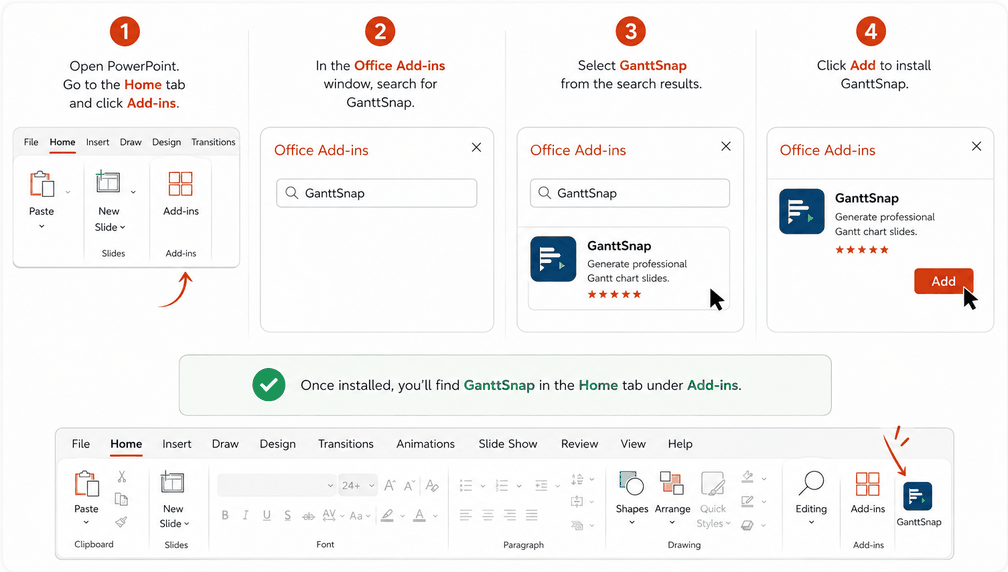
Open PowerPoint, go to the Home tab, and click Add-ins.
In the Office Add-ins window that opens, type "GanttSnap" into the search box.
Choose GanttSnap from the search results to see its details.
Click Add to install. PowerPoint sets it up automatically.
Prefer browsing the listing first — reviews, screenshots, details — before installing? Start here instead.
Get it now on Microsoft Marketplace →Click "Get it now" and sign in with your Microsoft account. PowerPoint installs the add-in automatically.
Find the GanttSnap button in your ribbon. Click it to open the taskpane — it's ready immediately.
On Pro or Advanced? Click "Free Plan — Enter license key", paste your key from the welcome email, and activate.
If your organisation deploys add-ins centrally via the Microsoft 365 Admin Centre, use the manifest file below.
For IT admins deploying via Microsoft 365 Admin Centre. Not needed for personal installs.
Need help? Email us at info@ganttsnap.com — we'll get you set up.